EPS to PSD Converter

EPS to PSD Converter is a free Chrome extension developed by toolbarteam101. As the name suggests, it allows users to convert EPS files to PSD format with ease.

Top Recommended Alternative

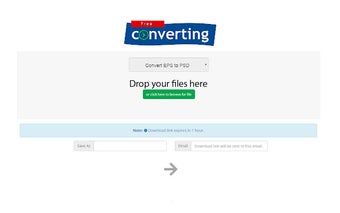
The conversion process is simple and straightforward. To convert an EPS file to PSD, users need to click on the extension icon, which will open an online conversion website. From there, they can select the EPS file they want to convert and click the convert button.

Once the conversion is complete, users will receive a download link for the PSD file in their email address. This ensures that the converted file can be easily accessed and downloaded for further use.

EPS to PSD Converter is a convenient tool for those who frequently work with EPS and PSD files, providing a quick and efficient way to convert between the two formats. With its user-friendly interface and reliable conversion process, it is a valuable addition to the arsenal of any designer or creative professional.

 0/1

App specs

Program available in other languages


User reviews about EPS to PSD Converter

Have you tried EPS to PSD Converter? Be the first to leave your opinion!

Add review

Top extensions for Google Chrome

Top downloads Add-ons & Tools for Google Chrome

Top downloads Add-ons & Tools for Google Chrome

Top downloads Add-ons & Tools for Google Chrome

Related topics about EPS to PSD Converter

You may also like

Explore Apps

Latest articles

Laws concerning the use of this software vary from country to country. We do not encourage or condone the use of this program if it is in violation of these laws.
Softonic

Is EPS to PSD Converter safe?

100/100

Score result: Clean

This file passed a comprehensive security scan using VirusTotal technology. It is safe to download.

  • Virus free
  • Spyware free
  • Malware free
  • Verified by Security Partners

    VirusTotal logo

Scan Info

Last scan
Friday, March 8, 2024
Scan provider
VirusTotal

Softonic security commitment

EPS to PSD Converter has been thoroughly scanned by our advanced security systems and verified by industry-leading partners. This file comes from the official developer and has passed all our security checks, showing no signs of viruses, malware, or spyware. For more information, visit our Security and Trust Center